
The idea
A failure belongs to one layer
The app, the Roblox client, the key system, the device and the network can each fail on their own. A fix aimed at the wrong one changes nothing. Reinstalling the same package cannot repair a revoked iOS certificate, a key-gateway interruption or a build that no longer matches Roblox.
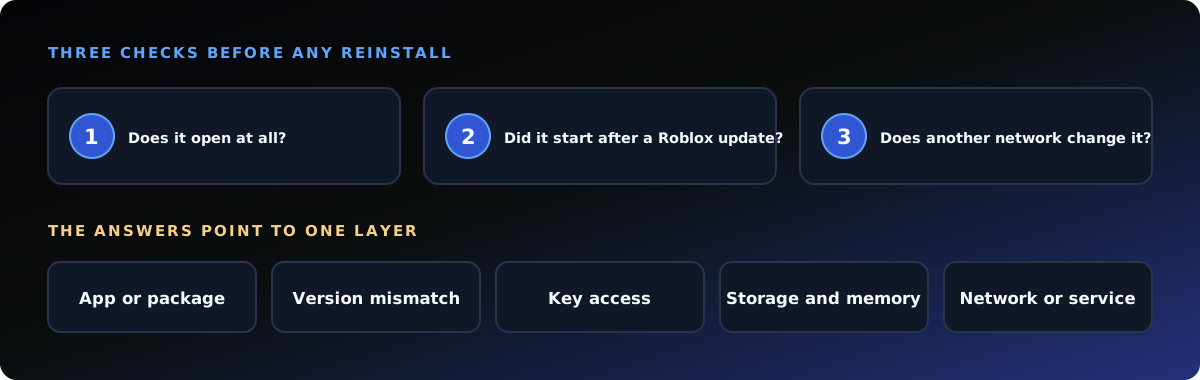
Match what you see
Five symptoms and where they point
Each of these has its own fuller guide on DeltaaExecutor.org, kept separate so that an iOS signing problem is never treated like an Android package error.
Platform warnings
Three messages that need their own fix
Android: "App not installed"
A signature conflict, low storage, a damaged download or an incompatible package. The wording under the message says which.
iPhone or iPad: cannot be verified
The signing certificate is no longer trusted. Reinstalling the same signed file does not restore it.
Windows or Mac: file will not open
Confirm what kind of build the file claims to be before running an unknown executable.
Do not do these
Fixes to avoid
A launch that works after one of these does not show the file is safe.
- Disabling antivirus or Play Protect
- Restoring a quarantined file to force a launch
- Installing a certificate from an unknown source
- Downloading a "patched" package from another domain
- Changing DNS or turning off a firewall
- Using copied "lifetime" keys or bypass pages